Create Wiki · Decoration
Copycat blocks
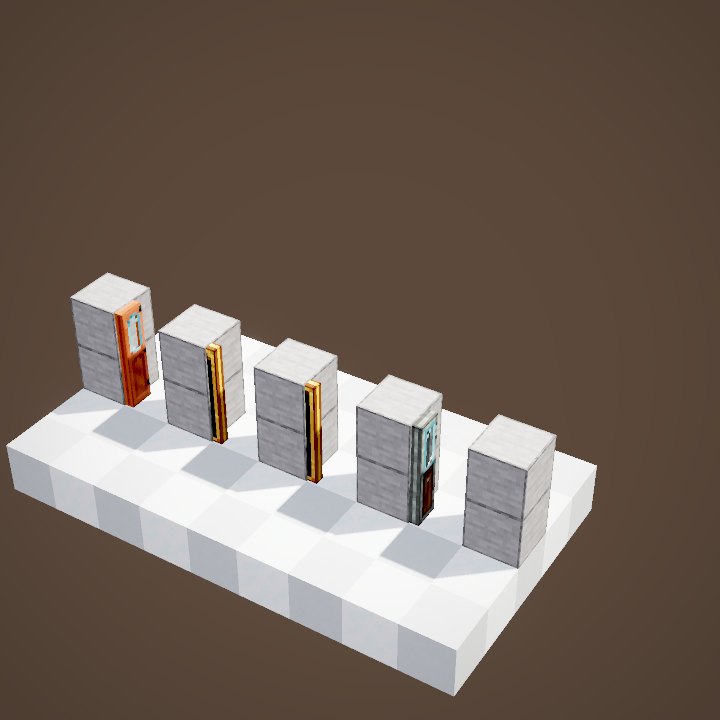
Copycat blocks are thin pieces that take on the look of the block you give them. The Copycat Panel is 3 pixels thick, the Copycat Step a quarter of a block. You place them empty, then a right-click with a block dresses them: wooden panels, stone steps, window frames, everything the game's slabs and stairs cannot do.
Quick facts
- Category
- Decoration
- Crafting
- 1 Zinc Ingot in a stonecutter → 4 panels or 4 steps
- Panel
- 3 pixels thick, against any face
- Step
- A quarter block (16 × 8 × 8), top or bottom
- Material
- A full block with no block entity; the panel also takes bars and trapdoors
- Removing
- Wrench: the material goes back to your inventory
- Light
- Copies the material’s light
- Version
- Create 6.0.8 · Minecraft 1.21.1
Stonecutter (1 ingot → 4)

 4
→ 4 Copycat Panels (or 4 Copycat Steps)
- 1 ×Zinc Ingot
Placing them empty
A panel goes against any face, on the floor, the ceiling or a wall. A step fills the lower or upper half of a half block, depending on where you aim. Empty, they have a neutral look, a sort of light grid: that is the Copycat Base, a technical block used as the default look, which you cannot obtain. Right-click a panel while holding another panel: the next one goes beside it, facing the same way.
Applying a block

Right-click the piece with a block in hand: it takes on that look and one of the blocks is used up (nothing in creative). You can also hold the material in your off hand when you place the piece: it is applied by itself. Clicking again with the same block cycles its orientation, handy for logs and pillars. A neighbouring piece that already holds that block passes its orientation on.
Steps

The step is a quarter block: at the bottom it makes a thin riser; at the top it completes a staircase or a cornice. Dressed in bricks or cut stone it gives finer stairs than the game's, and every stone of Create works.
Wall and glass panels

Standing up, panels become wainscoting, shutters or window frames. Glass works too: a glass panel makes a 3-pixel pane flush with the wall. The piece also copies the material's light, its sound, slipperiness, blast resistance and the tool needed to mine it.
What is accepted
The material must be a full, solid block. Refused: blocks with a block entity (chests, furnaces, machines), stairs, non-cubic blocks, other copycats, and the game's deny list: cauldrons, saplings and climbable blocks. The barrel is always accepted. The panel also takes bars (the "Copycat Bars", a technical model then draws bars in the right place) and trapdoors, oriented by the face.
Removing or changing the material

A click with the Wrench removes the material, which goes back to your inventory: the piece is empty again. Sneaking, the Wrench removes the material and then picks up the piece. You cannot apply another block on top: remove the first one before. Breaking the piece also gives the material back.
Building ideas
A staircase of offset steps, a floor raised by 3 pixels, shutters around a window, a slim bar counter, a gently sloped roof: copycats often replace a whole block where it would look too bulky. They can also hold water. Since one Zinc Ingot gives four, they are cheap once your zinc supply is running.
Common mistakes
Clicking with a chest, stairs or a slab does nothing: those blocks are refused. Clicking another block on an already dressed piece changes nothing either: use the Wrench first. And the Wrench does not rotate an empty piece: to change a panel's orientation, break it and place it again against the right face.
Related pages



Sources for the numbers (Create 6.0.8 code)
- Recipes: copycat_panel_from_ingots_zinc_stonecutting.json and copycat_step_from_ingots_zinc_stonecutting.json (1 Zinc Ingot → 4)
- Placing and material: CopycatBlock (useItemOn, setPlacedBy, getAcceptedBlockState, onWrenched), CopycatBlockEntity (cycleMaterial, setMaterial, updateLight), tags create:copycat_allow / copycat_deny
- Shapes: CopycatPanelBlock (3 px, bars and trapdoors: CopycatSpecialCases), CopycatStepBlock (HALF, FACING); Copycat Base and Copycat Bars: technical blocks with no item (AllBlocks)
- Scene written for this wiki (Create has no Ponder scene on this topic): WIKI/c2c_scenes.py, rendered by our engine (moving parts read from Create's BlockEntityRenderers: WIKI/c2c_parts.py); materials cut as in CopycatPanelModel / CopycatStepModel (cropAndMove)
- Images: the game's blocks and items (Create's models) rendered by our engine, player not drawn
Original texts and animations by Create France, rendered from the mod's Ponder scenes. Create is a mod by the Create Team, not affiliated with Create France.