Create Wiki · Create: Loconautics
Bearing Axle
The Bearing Axle is the block that turns a Create train into a real locomotive in Create: Loconautics. Placed against a bogey, it drives its wheels with the rotation it receives, and it tells the train where its front is. It also listens to two Redstone Link frequencies to steer left or right at junctions.
Quick facts
- Role
- Powers the wheels of the adjacent bogey and defines the front of the train
- Placement
- Beside the bogey, level with its rails; one axle per bogey
- Rotation
- Comes in through its shaft at the rear (usually from a Transmission)
- Top speed
- Create train top speed with the shaft at 256 RPM (bearingAxleMaxSpeed = -1)
- Stress
- Varies with load; ×1.5 when two engines of one consist fight each other
- Frequencies
- One for left, one for right, two items each
- Version
- Create: Loconautics 0.1.3 BETA · Create 6.0.10
Crafting table recipe


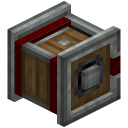

→ 1 Bearing Axle
- 1 ×Redstone Link
- 1 ×Block of Industrial Iron
- 1 ×Directional Gearshift (Simulated)
Where the axle goes
Start like any Create train: a bogey on the track. Then set the Bearing Axle directly beside it, level with the bogey and in line with its rails. An axle one block higher or lower has no effect. Each bogey accepts a single axle, so a heavier locomotive simply powers more bogeys. Looking at the axle through Engineer's Goggles confirms whether its position is valid.
Which end is the front
The two ends of the axle are not alike. The end facing the bogey is the front of your locomotive; the end with the shaft sticking out is always the rear. When it builds the train, the Train Station reads this to decide where the nose of the train points and how to park it. Get the orientation right before adding the rest: turning it afterwards means taking the whole thing apart.
Steering frequencies
Use the axle with nothing in your hand to bring up its screen. Row one holds the frequency that makes the train turn left at a junction, row two the one for turning right. Every frequency is two items, the same idea as a Redstone Link pair (copper and emerald, then quartz and amethyst in the video). Any transmitter tuned to those pairs, the Analog Controller first of all, then chooses the branch.
Speed and stress
The axle produces nothing: it passes the rotation it gets through its shaft on to the wheels. The faster the shaft turns, the faster the train goes; at 256 RPM it reaches Create's train top speed (setting bearingAxleMaxSpeed, -1 by default = Create's speed). Its stress cost changes with the load, and it is multiplied by 1.5 when two locomotives of the same consist pull against each other (opposedStressFactor). The simple way to give it an adjustable speed is to put a Transmission against its shaft.
Good to know
Gears and overdrive. By default the axle runs in « gear 0 »: at 256 RPM it reaches Create's train top speed. A redstone signal fed into the axle can move the axle up to an overdrive gear (option gearing.enabled, on): every spare SU of the network then buys a little extra speed (overdriveScale = 1). The capAtCreateTopSpeed option (off) keeps all gears under Create's speed, and trainMaxSpeed (-1) sets a hard ceiling for every train; without it only the physics safety limit of 200 applies. These are server settings: ask an admin before relying on them.
Tips
Common mistakes: an axle placed one block too high (on the bogey instead of beside it), two axles on the same bogey, or an axle facing the wrong way, so the locomotive pulls away in reverse. For a push-pull train, put an axle at each end, facing outwards, and give them the same steering frequencies. An axle does not brake: without rotation the locomotive coasts and only slows down through rolling resistance, so plan a Transmission to cut the power.
Related pages




Sources for the numbers (Create 6.0.10 · Create: Loconautics 0.1.3 BETA code)
- Code, data and Ponder storyboards: Create: Loconautics 0.1.3 BETA, public repository github.com/Creators-of-Locomotion/Create-Loconautics, commit 21970ec (last before the move to 0.1.4); its 26 Ponder structures and en_us.json are byte-identical to the loconautics-0.1.3BETA.jar of the Create France modpack
- License: code and data under MIT; textures, models, sounds and lang files all rights reserved (Lycoris). Our videos and images are renders from our own engine; our texts are original, no Ponder text is copied
- Numbers: config/LoconauticsConfig.java (defaults), content/combustion/SmallEngineTuning.java and CombustionFuel.java, content/transmission/TransmissionBlockEntity.java, content/hose/winch/HoseWinchBlockEntity.java, content/boiler/firebox/FireboxBlockEntity.java; experimental features: common/experimental/ExperimentalFeature.java and the modpack's config/loconautics-experimental.toml
- Recipes: data/loconautics/recipe/*.json in the 0.1.3 BETA jar
- Simulated 1.3.2 blocks (Portable Engine, Rope Connector, Physics Assembler): jar shipped with Create Aeronautics 1.3.2; code MIT, art all rights reserved (The Simulated Team)
Original texts and animations by Create France, rendered from the mod's Ponder scenes. Create is a mod by the Create Team, not affiliated with Create France.