Create Wiki · Create: Radars
Network, Monitor and Data Links
The Network Controller is the heart of any setup: radars send it their contacts, it hands them to Monitors and weapons, and it applies three filters. Blocks are wired with Data Links, always in the same order: select the source, then place the link on the block to connect.
Quick facts
- Monitor
- square multiblock up to 9 × 9, 3 Monitors per craft
- Controller filters
- detection, identification, targeting (3 slots on its face)
- Screen
- 100-block grid, radar sweep, coloured contacts
- Binoculars
- designation out to 512 blocks
- Compass
- bound to the controller, it points at the chosen contact
- Version
- Create: Radars 5.1.2 · Create 6.0.10
Crafting table recipe


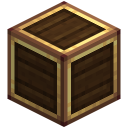

→ 1 Network Controller
- 1 ×Detection Filter
- 1 ×Targeting Filter
- 1 ×Identification Filter
- 1 ×Precision Mechanism
- 1 ×Brass Casing
The Network Controller
The Network Controller is crafted by putting the mod's three filters above a Precision Mechanism and Brass Casing (recipe shown here), so it comes fully equipped. One network, one controller. It detects nothing itself; it gathers what the radars see, shares it out and decides what is shown and what is shot at. Keep it somewhere safe; it needs no power.
Its three filters
Its face has three slots, one per filter; clicking a slot takes the filter out, clicking with a filter in hand puts it back. The Detection Filter (Electron Tubes, Paper, redstone) picks the visible categories: players, hostiles, animals, dropped items, projectiles, contraptions, ships. The Identification Filter lists friendly or hostile players and the codes of allied ships. The Targeting Filter (with a Precision Mechanism) turns on auto-targeting, auto-fire, the line of sight check and artillery arcs.
The Monitor
The Monitor is a multiblock screen: place several Monitors in a square, facing you, and they merge into one big display (up to 9 × 9 by default). The recipe gives three blocks: three Electron Tubes, Brass Casing and a Precision Mechanism. It stays dark until a radar feeds it, then shows a grid, the range circle and the rotating beam.
Connecting the Monitor

Take a Data Link, right-click the Network Controller (it is now selected), then place the link against the Monitor. Do the same for each radar, placing the link against its bearing or mount. Links have a limited reach: if the blocks are too far apart, a message tells you. One controller can feed several Monitors.
Reading the screen

Each contact is a coloured dot: blue for a player, red for a hostile mob, white for a contraption, yellow for a projectile or a ship, orange for a dropped item. It flares as the beam passes over it, then fades over five seconds until the next turn. Right-clicking the Monitor opens its interface (zoom, re-centring, saved views, locking onto a ship), where you click a contact to make it the target, framed in red. Sneak-right-click picks the contact straight on the block's screen (a client option swaps the two). In the mod's Ponder the beam freezes after a moment; we let it turn, as in game, with the radar in step.
Radars, screens and weapons together

Once wired, every radar on the network shares its contacts, every Monitor shows them, and linked weapons receive the chosen target (or find one on their own if auto-targeting is on). In the video we added the shaft driving the radar and the cannon mount turning toward the target; the mod's scene keeps everything still.
The Data Link in detail
The Data Link (a Redstone Torch, Brass Casing and a Transmitter stacked) comes in two finishes depending on the block it touches, but it is the same item. It ties radars, Monitors, warning receivers and jammers to the network, and cannon mounts to their controllers. For a weapon the order matters: first the Network Controller, next the Cannon Mount, last the pitch or yaw controller. Without a network, selecting just the mount and placing the link on the yaw controller is enough to pair them.
Joining the network

Click in the wrong order and the link refuses, with a message naming the missing step. A mount accepts one controller of each kind: a second yaw controller is turned down. Linked mounts receive targets continuously: in the video the gun swings toward its target as soon as the chain is complete, an addition of our render to show the effect.
Binoculars, safe zones and the compass
The Binoculars (two Glass Panes, two Copper Ingots, String) pair with the controller by sneak-right-clicking it. While zoomed in they designate the spot you look at out to 512 blocks and the network's guns turn to it; two rebindable keys designate and fire. The Safe Zone Designator (Compass, Paper, redstone) binds to a Monitor with a right-click, then two clicks on two blocks set the corners of an area the guns never fire into, drawn in grey on the screen. Finally, a Compass clicked on the controller then points at the chosen contact.
Related pages
 Create: RadarsCreate: Radars
 Building a radarCreate: Radars
 Automatic cannonsCreate: Radars
 Sky Radar Mount and Plane RadarCreate: Radars
 Radar Warning Receiver and Identification TransponderCreate: Radars
 Filters and ClipboardTools and equipment
 Redstone Link and Linked ControllerRedstone
 Cannon MountCreate Big Cannons
Sources for the numbers (Create Create: Radars 5.1.2 · Create 6.0.10 code)
- Create: Radars 5.1.2 (create_radar-5.1.2-1.21.1.jar from the next Create France modpack release): code from the public repository github.com/Arsenalists-of-Create/Create-Radar (NeoForge 1.21.1 branch, commit 8a7766a, version 5.1.2), recipes from the jar's data folder, Ponder scenes (PonderScenes.java) replayed by our engine.
- Mod by Aycer, HappySG, CeoOfGoogle, Kipti, OndatraCZE, Ray (furuochen) and KrimZik (Arsenalists of Create), under the Arsenalists-of-Create Source-Available License: models and textures by its authors, rendered from the official, unmodified jar; no text from the mod is copied. Official download: modrinth.com/mod/create-radars.
- Controller: block/controller/networkcontroller (NetworkFiltererBlock: three slots clicked on the face, compass bound to the chosen contact; NetworkFiltererRenderer); filters: DetectionConfig, item/*Filter*, interface buttons (categories, auto target, auto fire, line of sight, artillery mode).
- Monitor: block/monitor (MonitorBlock: click = select, sneak = interface depending on useGuiByDefault; MonitorMultiBlockHelper, monitorMaxSize 9; MonitorRenderer: gridBoxScale 100 grid, contact alpha = 1 - age / 100 ticks; config/client colours: player 0000FF, hostile FF0000, contraption FFFFFF, projectile and ship FFFF00, item FFA500).
- Links: block/datalink (selection orders, reach, radar / controller styles); Binoculars: item/binos/Binoculars.java (512 blocks); safe zone: SafeZoneDesignatorItem (Monitor, then two corners). Recipes: data/create_radar/recipe/crafting/network_filterer.json, monitor.json (x3), data_link.json, radar_filter_item.json, ident_filter_item.json, target_filter_item.json, binoculars.json, radar_safe_zone_designator.json.
- Scenes: PonderScenes.networkSetup (radar_network.nbt), monitorSetup (monitor_ponder.nbt), dataLinkSetup (data_link_ponder.nbt); the driven radar, continuous sweep and turning gun are additions of our render.
Original texts and animations by Create France, rendered from the mod's Ponder scenes. Create is a mod by the Create Team, not affiliated with Create France.